

WordPressテーマ Cocoon
このMASAa.netは、WordPressテーマ Cocoonを使って構築しています。

今回は、WordPressテーマ Cocoonでの「ブログカードにワンポイント表示追加」のカスタマイズについてまとめてみました。
WordPressテーマ Cocoon ブログカード
WordPressテーマ Cocoonの「ブログカード」に関するカスタマイズについては、過去2回行ってきました。

現在の「ブログカード」のスタイルは、次の様になっています。
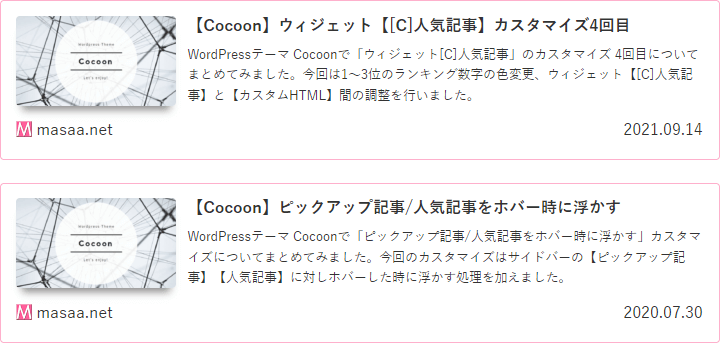
また、サイドバーのピックアップ記事で使っている「ブログカード」のスタイルは、次の様になっています。
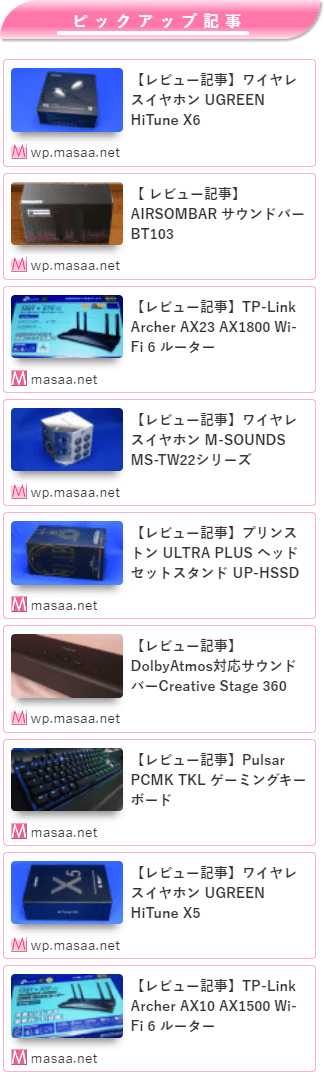
特に問題の無い「ブログカード」ですが、「ブログカード」の認識性向上のためワンポイント表示を追加したいと思います。
ブログカードにワンポイント表示追加のカスタマイズ
WordPressテーマ THE THOR(ザ・トール)での「ブログカードにワンポイント表示追加」のカスタマイズを行います。
カスタマイズ内容
「ブログカードにワンポイント表示追加」のカスタマイズ内容は、下記の通りです。
「スタイルシート(style.css)」を開き、下記のカスタマイズ内容を最後に追記する形でOKです。
/************************************
** ■ブログカード ⊿ワンポイント表示追加
************************************/
.main .blogcard { /*ブログカード*/
  padding-right: 6px; /*内側右余白*/
  padding-bottom: 6px; /*内側下余白*/
}
.main .blogcard:after { /*⊿ワンポイント*/
  margin-top: 0;
  border-top: solid 20px transparent;
  border-right: solid 20px #fe619a;
}
.main .blogcard-date { /*年月日*/
  margin-right: 5%;
}
#sidebar .blogcard,
#sidebar-menu-content .blogcard { /*サイドバーピックアップ記事(ブログカード)*/
  padding-top: 3px!important;
  padding-right: 4px; /*内側右下余白*/
  padding-bottom: 4px; /*内側下余白*/
}
#sidebar .blogcard:after,
#sidebar-menu-content .blogcard:after { /*⊿ワンポイント*/
  margin-top: 0;
  border-top: solid 12px transparent;
  border-right: solid 12px #fe619a;
}
.blogcard-footer { /*サイト名位置調整*/
  padding-top: 0;
}
.blogcard-post-date.internal-blogcard-post-date { /*ブログカード*/
  display: none /*日付削除*/
}
#sidebar .blogcard-footer.internal-blogcard-footer.cf,
#sidebar .blogcard-footer.external-blogcard-footer.cf,
#sidebar-menu-content .blogcard-footer.internal-blogcard-footer.cf,
#sidebar-menu-content .blogcard-footer.external-blogcard-footer.cf { /*サイドバーピックアップ記事(ブログカード)*/
  display: none; /*サイト名削除*/
}

.main .blogcard:after, /*ブログカード ⊿ワンポイント*/
#sidebar .blogcard:after, /*ブログカード ⊿ワンポイント*/
#sidebar-menu-content .blogcard:after { /*ブログカード ⊿ワンポイント*/
  animation:blinking 1.2s ease-in infinite alternate!important; /*点滅間隔1.2秒設定*/
}
@keyframes blinking {
  0% {
    opacity: 0.1;
  }
  81% {
    opacity: 1;
  }
  100% {
    opacity: 1;
  }
}
カスタマイズ後のブログカード
今回のカスタマイズによって、「ブログカード」のスタイルは、次の様になりました。
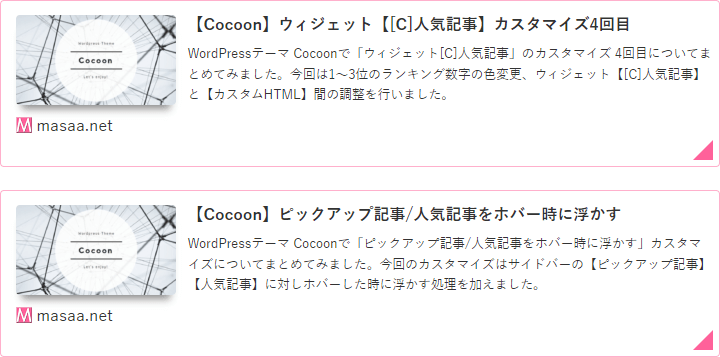
また、サイドバーのピックアップ記事で使っている「ブログカード」のスタイルは、次の様になりました。
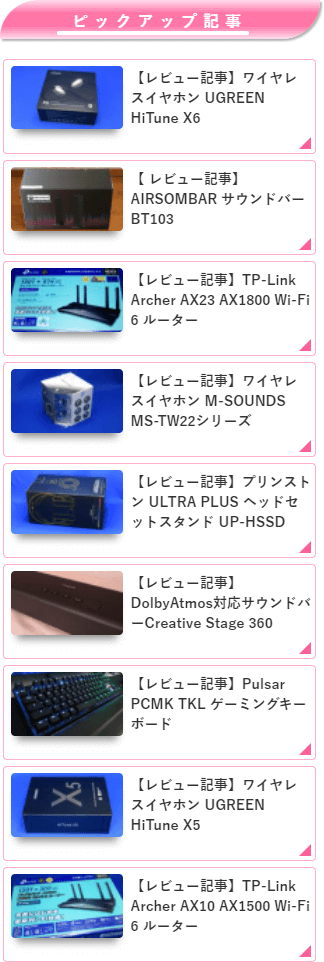
今回のカスタマイズ内容は、「ブログカード」の右下に〝⊿〟を表示しました。
なお、その〝⊿〟の表示は点滅するギミックを追加しています。
実際の動作については、このMASAa.netにてご確認下さい。
それ以外に、「ブログカード」の日付を非表示にしてみました。
また、サイドバーのピックアップ記事で使っている「ブログカード」に関しては、左下表示のサイト名を非表示にしてみました。
最後に
「ブログカード」にワンポイント表示を追加したことで、「ブログカード」の認識向上に繋がりました。
また、「ブログカード」の日付を非表示、サイドバーエリアのピックアップ記事で使っている「ブログカード」の左下に表示しているサイト名を非表示で、スッキリとしたスタイルとなりました。

コメント